Stayput documentation
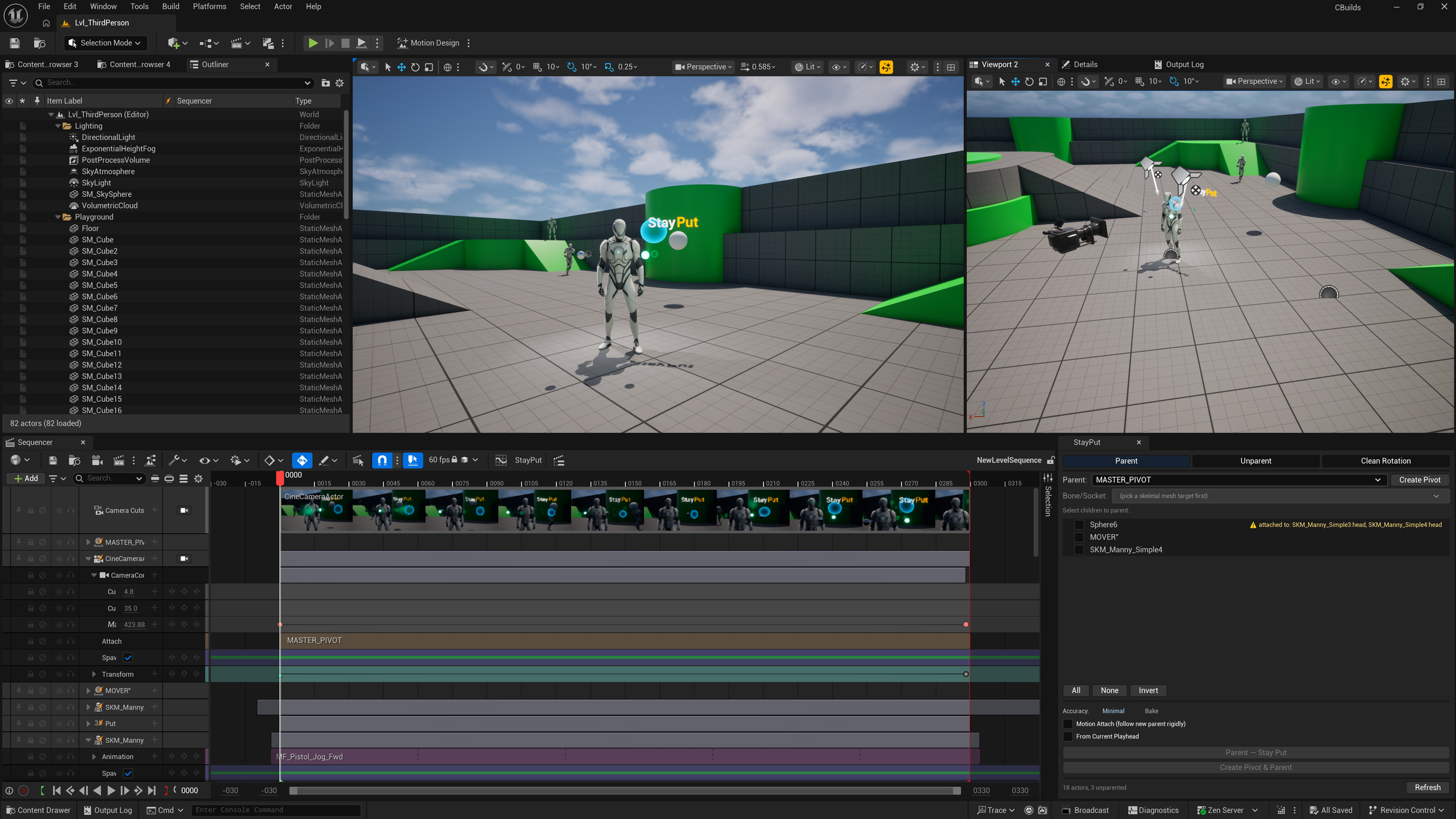
A Sequencer attachment tool for Unreal Engine.
StayPut handles attach and detach in a Level Sequence and rewrites the affected keyframes so the visual playback doesn't change. Use it when you need to switch parenting partway through a shot without re-animating anything.
Requirements
- Unreal Engine 5.4 to 5.7
- A Level Sequence with at least two actors that have transform tracks
Plugin Dependencies (enabled automatically):
- `LevelSequenceEditor`
This ships with the Unreal Editor. No setup required.
Installation
1. Copy the StayPut folder into your project's `Plugins/` directory
2. Open your project in Unreal Editor
3. The plugin loads on startup
Opening StayPut
1. Open a Level Sequence in Sequencer
2. Click the StayPut button in the Sequencer toolbar
3. The panel opens as a dockable tab. Dock it next to Sequencer.
Modes
Three modes, picked via the toggle buttons at the top of the panel.
Parent (Attach in Place)
Attach one or more child actors to a parent. Each child's keyframes are converted from world space into the parent's local space. Playback looks identical to before.
How to use:
1. Select Parent mode
2. Pick a parent from the dropdown
3. Tick the children you want to attach
4. Click Parent - Stay Put
StayPut creates a Sequencer Attach Track for each child and rewrites their transform keys.
Unparent (Detach in Place)
Detach children from their parent. Keys are baked from local back to world space. The Attach Track is removed.
How to use:
1. Select Unparent mode
2. The panel lists currently-attached actors
3. Tick the actors you want to detach
4. Click Unparent - Stay Put
Clean Rotation
Zero an actor's rotation and compensate every one of its children so nothing visually moves. Handy for cleaning up imported animation, or for resetting a parent's orientation without breaking the children's poses.
How to use:
1. Select Clean Rotation mode
2. The panel lists actors with non-zero rotation
3. Tick the actors to clean
4. Click Clean Rotation - Stay Put
Features
Bone & Socket Attachment
Attach a child to a specific bone or socket on a Skeletal Mesh. StayPut samples the bone's world transform every frame, accounting for animation, IK, and Control Rig, and converts the child's keys relative to that bone.
In Parent mode, when the picked parent has a Skeletal Mesh, a bone/socket picker appears under the parent dropdown.
If the parent Blueprint has more than one attachable component (two skeletal meshes, or a skel mesh plus a static mesh with sockets), a **Component** dropdown appears above the bone picker. Single-component bindings hide this row.
From Current Playhead (Space Switching)
Tick From Current Playhead to split the timeline at the Sequencer playhead. Keys before the playhead are left untouched; keys at and after the playhead get converted to the new space.
Used for mid-sequence space switches. A prop in one character's hand can be detached at frame 100 and attached to another character at the same frame. Past animation stays as it was.
Motion Attach
In Parent mode, tick Motion Attach to freeze the child to a single offset relative to the parent at the attach frame. The child then rigidly follows the parent and has no animation of its own past the attach point.
For prop handoffs: a sword passed between characters, an object picked up and carried.
Static Detach
In Unparent mode, tick Static Detach to freeze the child at its world position at the detach frame. The child no longer inherits the parent's motion; it stops dead.
For dropped objects: a character releases something while moving, and the prop stays where it was released.
Sample Density
Parent Keys Only (default): only modifies existing keyframes. Curves and tangents are preserved. Use when the parent is stationary or only changes at a few keys.
Bake Frame-by-Frame: evaluates every frame and writes a key at each one. Use when the parent is actively moving and you need exact tracking.
When Bake is selected, a Bake FPS control appears. Set to 0 to match the sequence's display rate, or pick any value between 5 and 240. Higher values produce smoother playback at unlocked viewport framerates but write more keyframes.
Pivot Creation
Create Pivot spawns an empty actor at the average position of the selected actors, adds it to the sequence with a transform track, and optionally parents the selection to it. Use for group pivots: camera rigs, actor clusters.
Selection Helpers
The panel has Select All, Select None, Invert Selection, Select All Parented (Unparent mode), and Select All With Rotation (Clean Rotation mode).
Pre-Flight Checks
Before running, StayPut checks for circular attachment chains, missing transform tracks, non-uniform parent scale, and existing attachments. Warnings appear in the confirmation dialog.
Undo Support
Every operation is wrapped in a single Undo transaction. Ctrl+Z reverses everything: key edits, attach tracks added or removed, the lot.
Technical Notes
- Rotation winding is preserved. A 720° spin stays as 720° after conversion; it doesn't collapse to 0°.
- Additive and relative transform sections are skipped. Only the absolute transform section is modified, so animation layers stay intact.
- Re-attaching an already-attached actor detaches from the old parent first.
- Operations use GUID-based binding references, not string lookups.
- The panel auto-refreshes when the sequence changes (tracks added or removed, attachments modified).